分类: 经验

  • TVBOX/影视仓_视频接口+直播接口推荐

    TVBOX/影视仓_视频接口+直播接口推荐

    (推荐)科技长青:

    http://yuan.haitangw.net/tv/

    (推荐)长青聚合多线:

    http://yuan.haitangw.net/box/

    (备用)摸鱼:

    http://我不是.摸鱼儿.top

    (备用)饭太硬

    http://www.饭太硬.com/tv/

    (备用)讴歌:

    http://tv.nxog.top/m/

    肥猫:

    http://肥猫.com

    春莹天下:

    https://盒子迷.top/春盈天下

    巧技

    http://cdn.qiaoji8.com/tvbox.json

    王小二:

    http://tvbox.xn--4kq62z5rby2qupq9ub.top/

    OK吊炸天:

    http://ok321.top/tv

    直播接口:

    http://yuan.haitangw.net/ZB/
  • ssl证书各个平台价格对比

    华为云:336.15元/年

    image.png

    阿里云:336.15元/年

    image.png

    腾讯云:532元/年

    image.png

    西部数码:38元/年

    image.png

  • 最好用的免费开源博客系统安装搭建

    下载地址

    blossom-1.16.0-web-blog.zip 1.76 MB

    blossom-1.16.0-web-client.zip 16.53 MB

    服务安装

    docker run -d \
      --name blossom-backend \
      -p 9999:9999 \
      -v /home/bl/:/home/bl/ \
      blossom:latest \
      --spring.datasource.url="jdbc:mysql://192.168.1.110:3306/blossom?useUnicode=true&characterEncoding=utf-8&allowPublicKeyRetrieval=true&allowMultiQueries=true&useSSL=false&&serverTimezone=GMT%2B8" \
      --spring.datasource.username=root \
      --spring.datasource.password=123456
  • javascript 删除数组元素

    在 JavaScript 中,数组是一种常见的数据类型,可以存储多个元素。有时候,我们需要从数组中删除某些特定的元素。本文将介绍如何使用 JavaScript 删除数组中指定的元素。

    1.使用splice()方法删除元素

    JavaScript 中的 splice() 方法可用于在数组中添加或删除元素。如果我们需要删除数组中的元素,可以使用 splice() 方法。该方法接受两个参数,第一个参数指定要删除的元素的位置,第二个参数指定要删除的元素个数。例如,我们可以使用以下代码删除数组中的第二个元素:

    let myArray = ["apple", "banana", "orange", "grape"];
    myArray.splice(1, 1);
    console.log(myArray); // ["apple", "orange", "grape"]

    输出结果为:["apple", "orange", "grape"]

    2.使用filter()方法删除元素

    除了使用 splice() 方法,我们还可以使用 filter() 方法来删除数组中的元素。该方法可用于创建一个新的数组,其中包含符合特定条件的元素。我们可以使用以下代码删除数组中的所有 “banana” 元素:

    let myArray = ["apple", "banana", "orange", "grape"];
    myArray = myArray.filter(function(item) {
      return item !== "banana"
    });
    console.log(myArray); // ["apple", "orange", "grape"]

    输出结果为:["apple", "orange", "grape"]

    3.使用pop()和shift()方法删除元素

    pop() 和 shift() 方法可用于删除数组的最后一个元素和第一个元素。如果我们想删除数组中的特定元素,可以使用这些方法与 indexOf() 方法结合使用。例如,以下代码可以删除数组中的第二个元素:

    let myArray = ["apple", "banana", "orange", "grape"];
    let index = myArray.indexOf("banana");
    if (index !== -1) {
      myArray.splice(index, 1);
    }
    console.log(myArray); // ["apple", "orange", "grape"]

    输出结果为:["apple", "orange", "grape"]

    4.使用slice()方法删除元素

    slice() 方法是一个纯函数,它不会改变原始数组,而是返回一个新的数组,该数组包含从开始到结束(不包含结束)的元素。我们可以使用以下代码删除数组中的第二个元素:

    let myArray = ["apple", "banana", "orange", "grape"];
    let newArray = myArray.slice(0, 1).concat(myArray.slice(2));
    console.log(newArray); //["apple", "orange", "grape"]

    输出结果为:["apple", "orange", "grape"]

    5.使用ES6的filter()方法删除元素

    ES6 中的 filter() 方法也可以用于删除数组中的元素。我们可以使用以下代码删除数组中的所有 “banana” 元素:

    let myArray = ["apple", "banana", "orange", "grape"];
    myArray = myArray.filter(item => item !== "banana");
    console.log(myArray); // ["apple", "orange", "grape"]

    输出结果为:["apple", "orange", "grape"]

    总结 以上是 JavaScript 删除数组中指定元素的多种方法。我们可以根据需求选择适合自己的方法来删除数组中的元素。希望这篇文章能够帮助你更好地掌握 JavaScript 中的数组操作。

  • CSS 设置垂直居中

    一、设置文字垂直居中

    1、line-height 使文字垂直居中

    
    <template>
        <div class="container">
            line-height 使文字垂直居中
        </div>
    </template>
    
    <style>
        .container{
            margin: 20px 0px;
            width: 100%;
            height: 100px;
            line-height: 100px;
            background-color: pink;
        }
    </style>

    2、flex布局 使文字垂直居中

    
    <template>
        <div class="container">
            flex布局 使文字垂直居中
        </div>
     </template>
    
    <style>
        .container{
            margin: 20px 0px;
            width: 100%;
            height: 100px;
            display: flex;
            align-items: center;
            background-color: pink;
        }
     </style>

    3、使用display和vertical-align 使文字垂直居中

    3.1 display: table和vertical-align: middle

    
    <template>
        <div class="parent">
            <div class="child">
    
    <div>使用display和vertical-align 使文字垂直居中</div>
    
    <div>使用display和vertical-align 使文字垂直居中</div>
            </div>
        </div>
    </template>
    
    <style>
        .parent {
            display: table;
            width: 100%;
            height: 100px;
            background-color: skyblue;
        }
    
        .child {
            display: table-cell;
            vertical-align: middle;
            background-color: pink;
        }
    </style>

    3.2 display: table-cell和vertical-align: middle

    
    <template>
        <div class="parent">
            <div class="child">
    
    <div>使用display和vertical-align 使文字垂直居中</div>
    
    <div>使用display和vertical-align 使文字垂直居中</div>
            </div>
        </div>
    </template>
    
    <style>
        .parent {
            width: 100%;
            height: 100px;
            background-color: skyblue;
            display: table-cell;
            vertical-align: middle;
        }
    
        .child {
            background-color: pink;
        }
    </style>

    二、设置块状元素垂直居中

    1、使用绝对定位和transform 使块状元素垂直居中(未知块状元素高度)

    
    <template>
        <div class="parent">
            <div class="child">
    
    <div>
                    使用绝对定位和transform 使块状元素垂直居中
                </div>
    
    <div>
                    使用绝对定位和transform 使块状元素垂直居中
                </div>
            </div>
        </div>
    </template>
    
    <style>
        .parent {
            width: 100%;
            height: 100vh;
            background-color: skyblue;
        }
    
        .child {
            width: 100%;
            position: absolute;
            top: 50%;
            transform: translate(0, -50%);
            background-color: pink;
        }
    </style>

    2、使用flex布局 使块状元素垂直居中(未知块状元素高度)

    2.1 display: flex和align-items: center

    
    <template>
        <div class="parent">
            <div class="child">
    
    <div>
                    使用flex布局 使块状元素垂直居中
                </div>
    
    <div>
                    使用flex布局 使块状元素垂直居中
                </div>
            </div>
        </div>
    </template>
    
    <style>
        .parent {
            width: 100%;
            height: 100vh;
            display: flex;
            align-items: center;
            background-color: skyblue;
        }
    
        .child {
            width: 100%;
            background-color: pink;
        }
    </style>

    2.2 display: flex和align-self: center

    
    <template>
        <div class="parent">
            <div class="child">
    
    <div>
                    使用flex布局 使块状元素垂直居中
                </div>
    
    <div>
                    使用flex布局 使块状元素垂直居中
                </div>
            </div>
        </div>
    </template>
    
    <style>
        .parent {
            width: 100%;
            height: 100vh;
            display: flex;
            background-color: skyblue;
        }
    
        .child {
            align-self: center;
            width: 100%;
            background-color: pink;
        }
    </style>

    3、使用绝对定位和margin 使块状元素垂直居中(已知块状元素高度)

    3.1 绝对定位和margin: auto

    
    <template>
        <div class="parent">
            <div class="child">
    
    <div>
                    使用绝对定位和margin 使块状元素垂直居中
                </div>
    
    <div>
                    使用绝对定位和margin 使块状元素垂直居中
                </div>
            </div>
        </div>
    </template>
    
    <style>
        .parent {
            width: 100%;
            height: 100vh;
            background-color: skyblue;
        }
    
        .child {
            width: 100%;
            height: 100px;
            position: absolute;
            top: 0;
            bottom: 0;
            left: 0;
            right: 0;
            margin: auto;
            background-color: pink;
        }
    </style>

    3.2 绝对定位和margin-top

    
    <template>
        <div class="parent">
            <div class="child">
    
    <div>
                    使用绝对定位和margin 使块状元素垂直居中
                </div>
    
    <div>
                    使用绝对定位和margin 使块状元素垂直居中
                </div>
            </div>
        </div>
    </template>
    
    <style>
        .parent {
            width: 100%;
            height: 100vh;
            background-color: skyblue;
            position: relative;
        }
    
        .child {
            width: 100%;
            height: 100px;
            position: absolute;
            top: 50%;
            margin-top: -50px;/* 高度的一半 */
            background-color: pink;
        }
    </style>

    4、使用padding 使块状元素垂直居中(已知元素高度)

    
    <template>
        <div class="parent">
            <div class="child">
    
    <div>使用padding 使块状元素垂直居中</div>
    
    <div>使用padding 使块状元素垂直居中</div>
            </div>
        </div>
    </template>
    
    <style>
        .parent {
            width: 100%;
            height: 300px;
            background-color: skyblue;
            padding: 100px 0;
            box-sizing: border-box;
        }
    
        .child {
            position: relative;
            width: 100%;
            height: 100px;
            background-color: pink;
        }
    </style>

    5、使用grid布局 使块状元素垂直居中(未知元素高度)

    
    <template>
        <div class="parent">
            <div class="child">
    
    <div>
                    使用grid布局 使块状元素垂直居中
                </div>
    
    <div>
                    使用grid布局 使块状元素垂直居中
                </div>
            </div>
        </div>
    </template>
    
    <style>
        .parent {
            width: 100%;
            height: 100vh;
            display: grid;
            background-color: skyblue;
        }
    
        .child {
            align-self: center;
            width: 100%;
            background-color: pink;
        }
    </style>

    6、使用伪元素:before 使块状元素垂直居中(未知元素高度)

    
    <template>
        <div class="parent">
            <div class="child">
    
    <div>
                    使用伪元素:before 使块状元素垂直居中
                </div>
    
    <div>
                    使用伪元素:before 使块状元素垂直居中
                </div>
            </div>
        </div>
    </template>
    
    <style>
        .parent {
            width: 100%;
            height: 100px;
            display: block;
            background-color: skyblue;
        }
    
        .parent:before {
            content: '';
            height: 100%;
            display: inline-block;
            vertical-align: middle;
        }
    
        .child {
            width: 100%;
            display: inline-block;
            vertical-align: middle;
            background-color: pink;
        }
    </style>
  • Windows PowerToys:屏幕标尺,测量屏幕上任何内容的像素

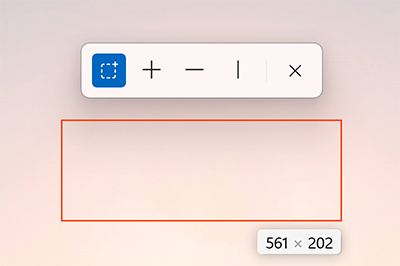
    Screen ruler 实用工具


    借助Screen ruler,可根据图像边缘检测快速测量屏幕上的像素。 此灵感来自于 Pete Blois 的 Rooler

    如何激活

    使用  ⊞ Win+Ctrl+Shift+ M 激活并选择要使用的工具。 若要关闭,请使用 Esc 或在工具栏中选择 ╳。

    如何使用

    • 边界(虚线正方形符号):这是一个边界框。 使用鼠标单击并拖动。 如果按住 Shift,框将保持原位,直到取消交互。
    • 间距 (╋):同时测量水平与垂直间距。 选择符号并将鼠标移动到目标位置。
    • 水平 (━):仅测量水平间距。 选择符号并将鼠标指针移动到目标位置。
    • 垂直 (┃):仅测量垂直间距。 选择符号并将鼠标指针移动到目标位置。
    • 取消交互:Esc、╳ 或鼠标单击。 单击主鼠标按钮时,测量值将复制到剪贴板。
    工具栏上的控件也可以通过  Ctrl+1/2/3/4 进行选择。

     提示

    使用鼠标滚轮向上滚动,每个滚轮刻度将像素差的阈值增加 15 个单位。 实际上,测量线可能会变长。 向下滚动以反转。

    设置

    从“设置”菜单中,可以配置以下选项:
    设置 说明
    激活快捷方式 用于打开或关闭工具栏的可自定义键盘命令。
    在测量期间连续捕获屏幕 关闭时,该实用工具会对屏幕拍摄一次快照。 启用此功能后,该实用工具将尝试实时检测。 使用连续模式时将消耗更多资源。
    按颜色通道边缘检测 测试所有颜色通道是否在彼此的公差距离内。 如果不是,请检查所有颜色通道差异的总和是否小于容错。
    边缘检测的像素容错 介于 0-255 之间的值。 值越高,差异越高,因此对渐变和阴影等设置的包容性越强。
    在交叉处绘制英尺 添加类似衬线的小“英尺,以获得额外的视觉识别。
    线条颜色 执行测量的线条的颜色。

    安装 PowerToys

    此实用工具是适用于超级用户的 Microsoft PowerToys 实用工具的一部分。 它提供一组有用的实用工具来优化和简化 Windows 体验,以提高工作效率。 若要安装 PowerToys,请参阅安装 PowerToys
  • S3 Browser 下载客户端

    S3 浏览器是适用于 Amazon S3 和 Amazon CloudFront 的免费 Windows 客户端。Amazon S3 提供了一个简单的 Web 服务接口,可用于存储和检索任何金额 的数据,随时随地从 Web 上的任何位置传输。Amazon CloudFront 是一个内容分发网络 (CDN)。 它可用于使用全球边缘站点网络传输您的文件。


    https://s3browser.com/download/s3browser-12-0-1.exe


    7bc4bea9673584b474684d76afe1d0ea
  • 413 Request Entity Too Large

    最近我们的网站服务平台上传apk(应用程序)的时候 上传60M的app的时候 报错nginx

    413 Request Entity Too Large

    经过排查修改nginx配置

    这是最简单的一个做法,着报错原因是nginx不允许上传配置过大的文件,那么件把nginx的上传大小配置调高就好。

    1、打开nginx主配置文件nginx.conf, 找到http{}段并修改以下内容:

    http {
        include       mime.types;
        default_type  application/octet-stream;
        server_names_hash_bucket_size 128;
        client_header_buffer_size 32k;
        large_client_header_buffers 4 32k;
        client_max_body_size 100m;
        limit_conn_zone $binary_remote_addr zone=one:32k;
        sendfile        on;
        tcp_nopush     on;
        keepalive_timeout  60;
        tcp_nodelay on;
        gzip  on;
        gzip_min_length  1k;
        gzip_buffers     4 16k;
        gzip_http_version 1.0;
        gzip_comp_level 2;
        gzip_types       text/plain application/x-javascript text/css application/xml;
        gzip_vary on;
        log_format  wwwlogs  '$remote_addr - $remote_user [$time_local] $request $status $body_bytes_sent $http_referer $http_user_agent $http_x_forwarded_for';
        #include default.conf;
        include vhost/*.conf;
    }


    client_max_body_size 100m;

    当中的100修改成你需要的允许文件大小。

    2、修改后,测试nginx配置是否正确

    重启nginx

    我们的项目是以php运行的,这个大小client_max_body_size要和php.ini中的如下值的最大值差不多或者稍大,这样就不会因为提交数据大小不一致出现错误。

    post_max_size = 100M
    
    upload_max_filesize = 100M

    当中的100M修改成你需要的允许文件大小。把当中的100M修改成你第一步设置的大小。

    我们修改完php.ini文件后 重启一下php 然后我们再上传60M的APP时ok 没问题

  • 应用软件安装·版本指导

    关于应用软件版本的选择,推荐使用官方、最新的LTS版(长期支持版本)。

    注:LTS(Long-Term Support)版本被认为是最稳定的版本,它经历了广泛的测试,并且大多包含了多年积累的改进。
    注:此文更新日期 2023-09-08

    操作系统

    • 关于操作系统的选择,考虑到 CentOS 7.9 将于 2024-07-30 停止更新,企业服务则推荐 Redhat Enterprise 8.6(有授权费用),免费系统则推荐 Oracle Linux 7.9,阿里云则推荐 Alibaba Linux 3.2104 LTS
    • 信创场景,推荐 银河麒麟 Server V10 SP3,若华为服务器则推荐 EulerOS 2.5
    • 免费场景,推荐 Ubuntu 22.04
    系统名称 推荐的版本 发布日期 官方地址
    CentOS CentOS 7.9 2014-06-10 https://www.centos.org/centos-linux
    Red Hat Red Hat Enterprise Linux release 8.6 2022-05-10 https://developers.redhat.com/products/rhel/download
    银河麒麟 Kylin Server V10 SP3 2023-04-28 https://www.kylinos.cn
    Ubuntu Ubuntu 22.04.2 LTS 2023-02-23 https://cn.ubuntu.com/download/server/step1
    openEuler openEuler 22.03 LTS SP2 2022-04-15 https://www.openeuler.org/zh/download
    Oracle Linux Oracle Linux 9.3 2024-04-23 https://yum.oracle.com/oracle-linux-isos.html
    Windows Windows Server 2022 2021-11-05 https://www.microsoft.com/zh-CN/windows-server
    虚拟化 Proxmox VE 7.4-1 2023-03-23 https://pve.proxmox.com/wiki/Downloads
    VMware 服务端 VMware vSphere Hypervisor (ESXi) 8.0U1a 2023-06-01 https://customerconnect.vmware.com/en/downloads
    VMware 个人版 VMware Workstation 17.0.2 Pro 2023-04-25 https://www.vmware.com/products/workstation-pro.html
    VirtualBox 7.0.12 2023-10-17 https://www.virtualbox.org/wiki/Downloads

    运维相关

    软件名称 当前最新的版本 发布日期 官方地址
    Docker 24.0.1 2023-05-19 https://download.docker.com/linux/static/stable/x86_64
    docker-compose v2.18.1 2023-05-17 https://github.com/docker/compose/releases
    Harbor v2.8.1 2023-05-12 https://github.com/goharbor/harbor/releases
    Rancher 2.7.1 2023-04-14 https://ranchermanager.docs.rancher.com/getting-started/overview
    Kubernetes 1.25.13 2023-08-24 https://kubernetes.io/releases/download https://github.com/kubernetes/kubernetes/releases
    Istio 1.17.2 2023-04-05 https://istio.io/latest/docs/setup/getting-started/#download
    Jenkins 2.387.3 LTS 2023-05-03 https://www.jenkins.io/download
    Gitlab 16.0 2023-05-22 https://about.gitlab.com/releases
    Zabbix 6.4 2023-05-30 https://www.zabbix.com/download
    Prometheus 2.44.0 2023-05-13 https://prometheus.io/download
    SkyWalking 9.4.0 2023-03-11 https://archive.apache.org/dist/skywalking
    Sentinel 1.8.6 2022-10-25 https://github.com/alibaba/Sentinel/tags
    Gluster 11.0 2023-02-07 https://download.gluster.org/pub/gluster/glusterfs
    openssl 3.1.2 2023-08-01 https://ftp.openssl.org/source
    openssh 9.7p1 2024-03-11 https://cdn.openbsd.org/pub/OpenBSD/OpenSSH/portable

    DBA相关

    软件名称 当前最新的版本 发布日期 官方地址
    Redis 7.0.11 2023-04-17 https://redis.io/download
    MySQL 8.0.32 2023-03-20 https://www.percona.com/downloads https://downloads.mysql.com/archives
    MongoDB 6.0.6 2023-05-12 https://www.mongodb.com/try/download/community https://www.mongodb.com/try/download/shell
    PostgreSQL 15.3 2023-05-11 https://www.postgresql.org/download
    SQL Server 2022 2022-11-16 https://www.microsoft.com/zh-cn/sql-server/sql-server-downloads
    SSMS 19.1 2023-05-24 https://docs.microsoft.com/en-us/sql/ssms
    Oracle 21c 2021-08-13 https://docs.oracle.com/en/database/oracle/oracle-database/index.html
    TiDB 7.1.0 2023-05-31 https://docs.pingcap.com/zh/tidb/stable/release-notes
    Couchbase 7.6.0 2024-03 https://www.couchbase.com/downloads
    Memcached 1.6.30 2024-09-05 https://memcached.org/downloads
    Archery v1.9.1 2022-10-07 https://github.com/hhyo/archery/releases
    sqle v2.2304.0 2023-04-28 https://github.com/actiontech/sqle/releases
    Yearning v3.1.4 2023-04-24 https://github.com/cookieY/Yearning/releases

    开发相关

    软件名称 当前最新的版本 发布日期 官方地址
    JDK 1.8.0_381 2023-03-21 https://www.oracle.com/java/technologies/downloads
    OpenJDK 20.0.2 2023-06-14 https://jdk.java.net/archive (开源jdk,但也是oracle维护)
    Python 3.11.3 2023-04-05 https://www.python.org/downloads
    Node.js v20.12.1 2024-04-03 https://nodejs.org/en/download
    Nginx 1.25.0 2023-05-23 https://nginx.org/en/download.html
    Apache httpd 2.4.57 2023-04-06 https://httpd.apache.org/download.cgi
    Apache Tomcat 10.1.9 2023-05-19 https://tomcat.apache.org
    Apache Log4j 2.20.0 2023-02-17 https://logging.apache.org/log4j/2.x/download.html
    OpenSSL 3.1.0 2023-03-14 https://www.openssl.org/source
    MinIO RELEASE.2023-09-07 2023-09-07 https://min.io/download#/linux https://dl.min.io/server/minio/release
    MinIO Client RELEASE.2023-09-07 2023-09-07 https://dl.min.io/client/mc/release
    xxl-job 2.4.0 2023-03-23 https://github.com/xuxueli/xxl-job/releases
    ZooKeeper 3.8.1 2023-01-30 https://zookeeper.apache.org/releases.html
    ElasticSearch 8.7.1 2023-05-03 https://www.elastic.co/cn/downloads/elasticsearch
    org.kie/drools 8.39.0.Final 2023-05-25 https://www.drools.org/download/download.html
    Go 1.20.5 2023-02-01 https://golang.google.cn/dl
    Maven 3.9.3 2023-06-26 https://maven.apache.org/download.cgi https://maven.apache.org/docs/history.html
    Metabase 0.50.6 2024-06-19 https://github.com/metabase/metabase/releases
    antd 5.8.6 2023-09-02
    element-ui 2.15.4 2021-08-03
    dva 2.6.0-beta.19 2019-11-21
    umi 4.0.79 2023-09-01
    react 18.2.0 2022-06-15
    react-dom 18.2.0 2022-06-15
    webpack 5.88.2 2023-07-13

    大数据相关

    软件名称 当前最新的版本 发布日期 官方地址
    Hadoop 3.3.5 2023-03-22 https://hadoop.apache.org/releases.html
    Hive 3.1.3 2022-04-08 https://hive.apache.org/general/downloads
    HBase 2.5.4 2023-04-14 https://hbase.apache.org/downloads.html
    Spark 3.4.0 2023-04-13 http://spark.incubator.apache.org/downloads.html
    azkaban 4.0.0 2021-03-18 https://github.com/azkaban/azkaban/tags
    Oozie 5.2.1 2022-07-18 https://archive.apache.org/dist/oozie
    DolphinScheduler 3.1.7 2023-05-25 https://dolphinscheduler.apache.org/zh-cn/download
    Flume 1.11.0 2022-10-24 https://flume.apache.org/releases/index.html
    Sqoop 1.4.7 2020-07-06 https://archive.apache.org/dist/sqoop
    DataX v202303 2023-03-23 https://github.com/alibaba/DataX/releases
    Flink 1.17.0 2023-03-23 https://flink.apache.org/downloads
    Storm 2.4.0 2022-03-25 https://storm.apache.org/downloads.html
    Kafka 3.4.0 2023-02-07 https://kafka.apache.org/downloads
    Erlang 26.0.1 2023-06-08 https://www.erlang.org/downloads https://github.com/rabbitmq/erlang-rpm/releases
    RabbitMQ 3.12.1 2023-06-26 https://www.rabbitmq.com/download.html https://www.rabbitmq.com/news.html

    微服务技术栈

    软件名称 当前最新的版本 发布日期 官方地址
    Nacos 2.2.4 2023-06-20 https://github.com/alibaba/nacos/tags
    seata v2.0.0 2023-11-24 https://github.com/seata/seata/tags
    Spring Cloud Alibaba 2022.0.0.0 2023-07-25 https://sca.aliyun.com/zh-cn/version/version
    vue 2.7.14 2022-11-09
    vuex 3.6.2 2021-01-26
    vue-router 3.6.5 2022-09-06
    apisix
    Apollo
    Sentinel

    好用的镜像站

    分类 网站用途 下载地址
    linux 基于linux的rpm下载 http://rpm.pbone.net
    linux 基于linux的rpm下载-推荐 https://rpmfind.net/linux/rpm2html/search.php
    ubuntu 基于ubuntu的deb下载-官方-推荐 https://packages.ubuntu.com
    ubuntu 基于ubuntu的deb下载 https://launchpad.net/ubuntu
    不限os系统 华为云-镜像库 https://mirrors.huaweicloud.com/repository
    不限os系统 清华大学-开源软件镜像站 https://mirrors.tuna.tsinghua.edu.cn
    信创-麒麟 麒麟V10的rpm源 https://update.cs2c.com.cn/NS/V10
    信创-鲲鹏 华为云-镜像库-鲲鹏系统 https://mirrors.huaweicloud.com/kunpeng
    python 基于python的package下载 https://pypi.org
    python 基于Wheel格式的python包下载 https://www.lfd.uci.edu/~gohlke/pythonlibs
    工具 i tell you 工具资源下载 https://msdn.itellyou.cn/
    Copyright © www.sqlfans.cn 2023 All Right Reserved
  • 常用软件快速安装

    [TOC]

    基础环境

    安装 docker 24.0.1

    • 适用于:Centos 7.9、Kylin V10、EulerOS 2.5、Ubuntu 20.04、Oracle Linux 7.9
    curl -sL 'http://iso.sqlfans.cn/docker/install_docker_2401.sh' | bash
    docker --version
    

    安装 docker-compose 2.18.1

    • 适用于:Centos 7.9、Kylin V10、EulerOS 2.5、Ubuntu 20.04、Oracle Linux 7.9
    curl -sL 'http://iso.sqlfans.cn/docker/install_docker_compose_2181.sh' | bash
    docker-compose --version
    

    安装 jdk 20.0.2

    • 适用于:Centos 7.9、Kylin V10、EulerOS 2.5、Ubuntu 20.04、Oracle Linux 7.9
    curl -sL http://iso.sqlfans.cn/jdk/install_openjdk_2002.sh | bash
    source /etc/bashrc
    java -version
    

    安装 jdk 1.8.0_391

    • 适用于:Centos 7.9、Kylin V10、EulerOS 2.5、Ubuntu 20.04、Oracle Linux 7.9
    curl -sL http://iso.sqlfans.cn/jdk/install_jdk_8u391.sh | bash
    source /etc/bashrc
    java -version
    

    安装 node.js 16.20.2

    • 适用于:Centos 7.9、Kylin V10、EulerOS 2.5、Ubuntu 20.04、Oracle Linux 7.9,请使用与glibc兼容的node.js版本
    curl -sL http://iso.sqlfans.cn/linux/install_nodejs_16202.sh | bash
    node -v
    

    安装 gcc 4.8.5

    • 适用于:Centos 7.9、Kylin V10、EulerOS 2.5、Oracle Linux 7.9,不支持 Ubuntu
    #.在线安装
    # yum install -y gcc
    
    #.离线安装
    curl -L http://iso.sqlfans.cn/linux/gcc-4.8.5.tar.gz -o /opt/gcc-4.8.5.tar.gz
    tar xvf /opt/gcc-4.8.5.tar.gz -C /opt/
    rpm -Uvh /opt/gcc-4.8.5/*.rpm --nodeps --force
    gcc --version
    

    安装 python 3.12.3

    • 适用于:Centos 7.9、Kylin V10、EulerOS 2.5、Oracle Linux 7.9,不支持 Ubuntu
    #.安装gcc及zlib这2个必要依赖
    yum install -y gcc zlib zlib-devel
    
    #.开始安装
    curl -sL 'http://iso.sqlfans.cn/python/install_python_3123.sh' | bash
    python3 --version
    pip3 --version
    

    安装 pip 19.3.1

    • 适用于:Centos 7.9、Kylin V10、EulerOS 2.5、Oracle Linux 7.9,不支持 Ubuntu
    #.基于 Python 2.7.5
    curl -sL 'http://iso.sqlfans.cn/python/install_pip_1931.sh' | bash
    pip --version
    

    常用中间件

    安装 nginx 1.25.0

    • 适用于:Centos 7.9、Kylin V10、EulerOS 2.5、Oracle Linux 7.9,不支持 Ubuntu
    #.开始安装
    cd /opt
    wget -c http://iso.sqlfans.cn/linux/zlib-1.2.11.tar.gz
    wget -c http://iso.sqlfans.cn/linux/pcre-8.44.tar.gz
    wget -c http://iso.sqlfans.cn/linux/openssl-1.1.1g.tar.gz
    wget -c http://iso.sqlfans.cn/linux/nginx-1.25.0.tar.gz
    wget -c http://iso.sqlfans.cn/linux/nginx_openssl_conf.conf
    wget -c http://iso.sqlfans.cn/linux/install_nginx_1250.sh
    bash install_nginx_1250.sh
    
    #.确认版本
    /usr/local/nginx/sbin/nginx -version
    

    安装 mysql 5.7.44

    • 适用于:Centos 7.9、Kylin V10、Oracle Linux 7.9,不支持 Ubuntu
    #.ubuntu请改为:apt install -y libaio1 libaio-dev
    
    #.开始安装
    cd /opt
    curl -L http://iso.sqlfans.cn/mysql/percona-server-5.7.44-48.tar.gz -o /opt/percona-server-5.7.44-48.tar.gz
    curl -sL http://iso.sqlfans.cn/mysql/config/5.7/my_innodb.cnf -o /opt/my_innodb.cnf
    curl -sL http://iso.sqlfans.cn/mysql/install_percona_5744.sh -o /opt/install_percona_5744.sh
    bash install_percona_5744.sh /opt /data 3306
    
    #.登录测试
    mysql -udba_admin -pcf_rB1NKCzbaQuPH -S /tmp/mysql_3306.sock -e"select host,user,plugin,account_locked from mysql.user;"
    

    安装 mysql 8.0.32

    • 适用于:Centos 7.9、Kylin V10、Oracle Linux 7.9,不支持 Ubuntu
    #.开始安装
    cd /opt
    curl -L http://iso.sqlfans.cn/mysql/percona-server-8.0.32-24.tar.gz -o /opt/percona-server-8.0.32-24.tar.gz
    curl -sL http://iso.sqlfans.cn/mysql/config/8.0/my_innodb.cnf -o /opt/my_innodb.cnf
    curl -sL http://iso.sqlfans.cn/mysql/install_percona_8032.sh -o /opt/install_percona_8032.sh
    bash install_percona_8032.sh /opt /data 3306
    
    #.登录测试
    mysql -udba_admin -pcf_rB1NKCzbaQuPH -S /tmp/mysql_3306.sock -e"select host,user,plugin,account_locked from mysql.user;"
    

    安装 mysql 8.4.0

    • 适用于:Centos 7.9、Kylin V10、Oracle Linux 7.9,不支持 Ubuntu
    #.开始安装
    cd /opt
    curl -L http://iso.sqlfans.cn/mysql/percona-server-8.4.0-1.tar.gz -o /opt/percona-server-8.4.0-1.tar.gz
    curl -sL http://iso.sqlfans.cn/mysql/config/8.4/my_innodb.cnf -o /opt/my_innodb.cnf
    curl -sL http://iso.sqlfans.cn/mysql/install_percona_8401.sh -o /opt/install_percona_8401.sh
    bash install_percona_8401.sh /opt /data 3306
    
    #.登录测试
    mysql -udba_admin -pcf_rB1NKCzbaQuPH -S /tmp/mysql_3306.sock -e"select host,user,plugin,account_locked from mysql.user;"
    

    安装 redis 6.2.5

    • 适用于:Centos 7.9、Kylin V10、Ubuntu 20.04、Oracle Linux 7.9,在 EulerOS 2.5 会遇到 Permission denied 问题
    #.开始安装
    cd /opt/
    wget -c http://iso.sqlfans.cn/redis/redis-6.2.5.tar.gz
    wget -c http://iso.sqlfans.cn/redis/install_redis_625.sh
    bash install_redis_625.sh /data 6379
    
    #.登录测试
    echo "info keyspace" | /usr/local/bin/redis-cli -a RbY9k2_NBf1QWy8I -c -p 6379 2>/dev/null
    

    安装 redis 7.0.11

    • 适用于:Centos 7.9、Kylin V10、Ubuntu 20.04、Oracle Linux 7.9,在 EulerOS 2.5 会遇到 Permission denied 问题
    #.开始安装
    cd /opt/
    wget -c http://iso.sqlfans.cn/redis/redis-7.0.11.tar.gz
    wget -c http://iso.sqlfans.cn/redis/install_redis_7011.sh
    bash install_redis_7011.sh /data 6379
    
    #.登陆测试
    echo "info keyspace" | /usr/local/bin/redis-cli -a RbY9k2_NBf1QWy8I -c -p 6379 2>/dev/null
    

    安装 mongodb 6.0.6

    • 适用于:Centos 7.9、Kylin V10、EulerOS 2.5、Oracle Linux 7.9,不支持 Ubuntu
    #.从5.0开始要求CPU必须支持AVX指令集,执行如下命令若无返回则表示不支持adx
    cat /proc/cpuinfo | grep avx
    
    #.开始安装
    cd /opt
    wget -c http://iso.sqlfans.cn/linux/numactl-2.0.12-5.el7.x86_64.rpm
    wget -c http://iso.sqlfans.cn/linux/openssl-1.0.2k-26.el7_9.x86_64.rpm
    wget -c http://iso.sqlfans.cn/mongodb/mongodb-linux-x86_64-rhel70-6.0.6.tgz
    wget -c http://iso.sqlfans.cn/mongodb/mongosh-1.6.0-linux-x64.tgz
    wget -c http://iso.sqlfans.cn/mongodb/install_mongodb_606.sh
    bash install_mongodb_606.sh /data 3717
    
    #.登陆测试
    echo "db.system.users.find();" | /usr/local/mongodb/bin/mongosh -u dba_admin -p 1_yyJnwRD48CbSql --authenticationDatabase admin --host 127.0.0.1 --port 3717 admin
    

    安装 postgresql 10.12-1

    • 适用于:Centos 7.9、Kylin V10、Oracle Linux 7.9,在 EulerOS 2.5 会遇到 Permission denied 问题
    #.开始安装
    cd /opt/
    wget -c http://iso.sqlfans.cn/postgresql/postgresql-10.12-1-linux-x64-binaries.tar.gz
    wget -c http://iso.sqlfans.cn/postgresql/install_pgsql_1012.sh
    wget -c http://iso.sqlfans.cn/postgresql/my_pgsql.conf
    bash install_pgsql_1012.sh /opt /data 1921
    
    #.登陆测试
    /opt/pgsql/bin/psql -h 127.0.0.1 -p 1921 -U postgres -d postgres -c "SELECT * FROM pg_shadow;"
    

    安装 oracle 11g

    • 适用于:Centos 7.9、Kylin V10、Oracle Linux 7.9
    #.开始安装
    cd /opt/
    wget -c http://iso.sqlfans.cn/oracle/p13390677_112040_Linux-x86-64_1of7.zip
    wget -c http://iso.sqlfans.cn/oracle/p13390677_112040_Linux-x86-64_2of7.zip
    wget -c http://iso.sqlfans.cn/oracle/install_oracle_11g.sh
    bash install_oracle_11g.sh
    
    #.登陆测试
    su - oracle -c "sqlplus / as sysdba"
    SQL> select * from v
    $version
    ;
    

    安装 minio 2023-06-29

    • 适用于:Centos 7.9、Kylin V10、EulerOS 2.5、Ubuntu 20.04、Oracle Linux 7.9
    #.开始安装
    mkdir -p /data/minio_9000/{data,logs}
    curl -L http://iso.sqlfans.cn/linux/minio.2023-06-29 -o /data/minio_9000/minio
    chmod +x /data/minio_9000/minio
    
    export MINIO_ROOT_USER
    =minioadmin
    export MINIO_ROOT_PASSWORD
    =Admin_147
    nohup /data/minio_9000/minio server /data/minio_9000/data --console-address=
    ":9100" > /data/minio_9000/logs/minio.log 2>
    &1 &
    
    #.登录测试
    地址:http://{ip}:9100
    账号:minioadmin
    密码:Admin_147
    

    安装 elasticsearch 7.10.1

    • 适用于:Centos 7.9、Kylin V10、Oracle Linux 7.9
    #.开始安装
    curl -sL 'http://iso.sqlfans.cn/linux/install_elasticsearch_7101.sh' | bash
    /data/elasticsearch_9200/bin/elasticsearch --version
    
    #.登陆测试
    curl http://127.0.0.1:9200/_cat/indices?v
    
    Copyright © www.sqlfans.cn 2023 All Right Reserved